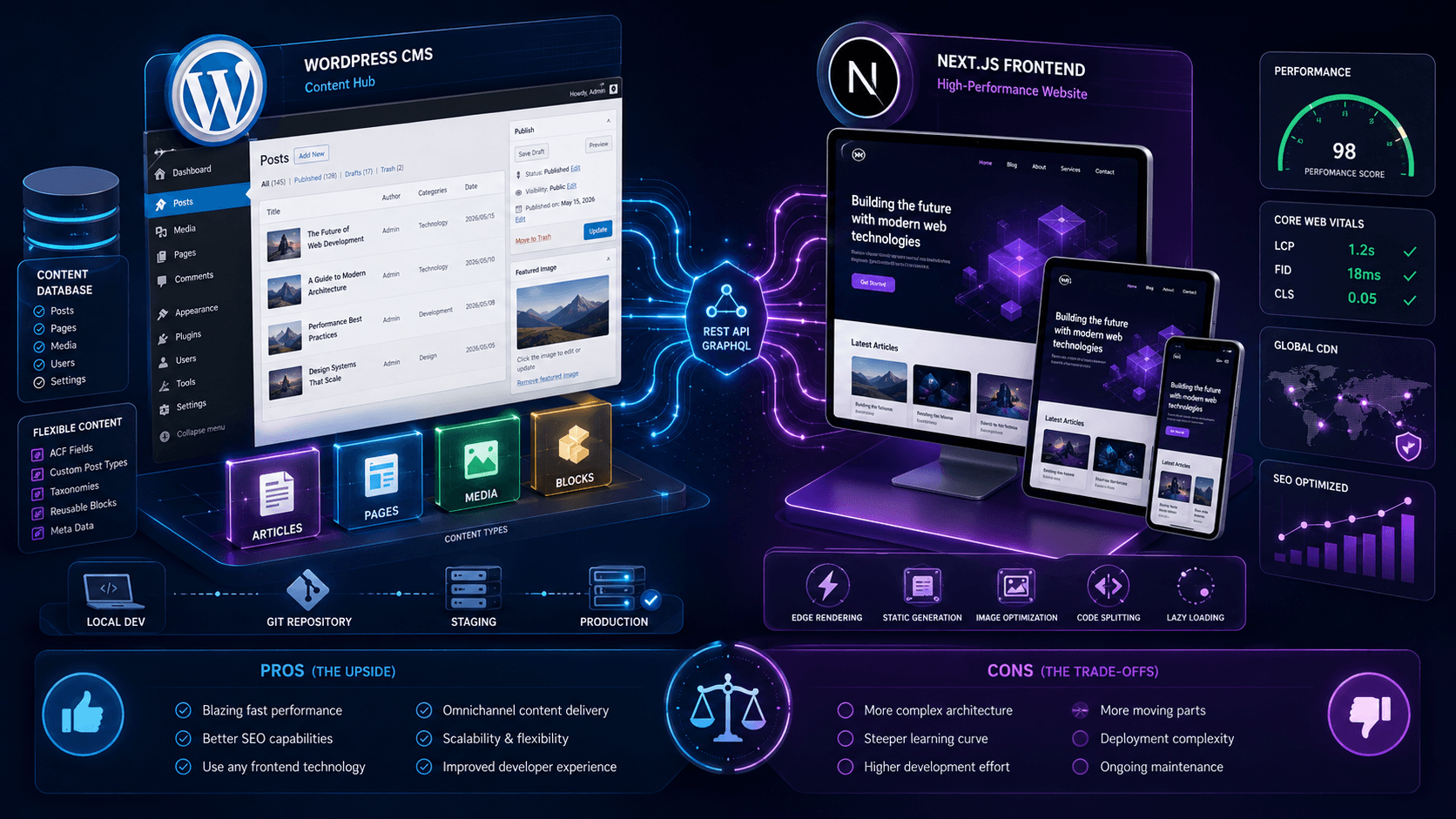
Short answer: Headless WordPress is worth it when you need real performance headroom, frontend control, or multiple experiences from one CMS—and your team can maintain two systems. It is not worth it when a tuned WordPress site would do the job. Both outcomes are common.
Most migration conversations start with speed. That is fair—but the decision is architectural, not cosmetic. This post covers the real pros and cons. For how headless works in practice, see our headless WordPress with Next.js guide. For budgets, see WordPress to Next.js migration cost.
What headless WordPress actually is
Traditional WordPress does two jobs: it stores content and renders the pages visitors see.
Headless WordPress splits those jobs. Editors still use WordPress admin. The public site is a separate front end—usually Next.js—that pulls content through the REST API or WPGraphQL.
For editors, little changes. For developers, almost everything changes.
The biggest advantage is performance
This is the main reason businesses look at headless.
WordPress assembles many pages on each request—PHP, database, theme, plugins. Next.js can pre-render or cache pages so visitors get HTML faster, with less JavaScript fighting the main thread.
That can mean better Core Web Vitals and a smoother mobile experience—when the front end is built properly.
Headless is not automatically fast. We have seen poorly built Next.js fronts score worse than the WordPress they replaced. Performance still depends on implementation.
Developers get more freedom
One problem facing which is WordPress themes have limitations.
A design looks good until a plugin injects unexpected markup. A layout works until an update changes something. A custom feature becomes harder than it should be because you're fighting against existing architecture.
Headless removes a lot of those constraints.
The frontend becomes its own application. Developers can structure components, routing, performance, and rendering however they want.
For teams building complex digital products, that's valuable.
Editors can keep using WordPress
This part gets overlooked.
Many businesses don't want to retrain their content teams.
Marketing managers already know WordPress. Content editors already understand WordPress. Support teams already know where everything lives.
Headless lets those workflows continue while the frontend evolves separately.
Compared to a complete CMS migration, that's usually far less disruptive.
The downside is complexity
This is where many blog posts become overly optimistic.
A traditional WordPress website has one system.
A headless website has at least two.
You now have WordPress, APIs, frontend deployment, hosting for the application, content fetching, build processes, and monitoring across both sides.
None of this is impossible. It simply means more moving parts.
More moving parts generally means more things that can break.
Plugin compatibility changes completely
Many WordPress plugins assume WordPress controls the frontend.
That's no longer true in a headless setup.
A plugin that works perfectly on a traditional WordPress site may provide very little value once the frontend moves to Next.js.
SEO plugins, page builders, form plugins, search plugins, and visual editing tools all need individual evaluation.
Some continue working. Some require alternative solutions. Some stop being relevant altogether.
Costs are usually higher
Not because headless is fashionable—because you are building and maintaining more technology.
Development takes longer. Infrastructure is split across WordPress and the front end. New features often need changes on both sides, not just a plugin install.
A small brochure site rarely sees enough benefit to justify that spend. A larger platform might. See real migration cost ranges before you budget.
When Headless WordPress makes sense
Performance requirements are becoming difficult to achieve.
The website has outgrown its current theme architecture.
There are multiple frontend experiences consuming the same content.
The business wants greater control over performance, SEO, and user experience.
Development teams need flexibility that traditional themes can't provide.
These are usually good reasons to explore headless—and to read the full architecture and setup guide before you commit.
When it probably doesn't
The site has ten pages.
The current setup works fine.
No one is experiencing performance issues.
The business publishes occasional blog posts and updates contact information a few times a year.
In those situations, headless often solves a problem that doesn't exist.
We've seen businesses spend months planning migrations that produced almost no measurable improvement.
What most businesses should do first
Before discussing a migration, audit the existing WordPress site.
Review plugins. Check hosting. Measure Core Web Vitals. Examine theme performance. Look at caching.
Start with fixing Core Web Vitals on WordPress and why WordPress is slow—many performance complaints clear up before any migration.
If the site still hits architectural limits after that, the headless conversation becomes much more interesting.
FAQ: Headless WordPress
What are the benefits of using a headless CMS with WordPress?
Faster page delivery through static generation and CDN caching, tighter control over JavaScript and Core Web Vitals, front-end flexibility without theme constraints, better security (WordPress admin isn't publicly exposed), and the ability to serve content to multiple channels — web, app, email — from one CMS.
Why migrate WordPress to a headless CMS?
When mobile performance is blocking conversions, plugin bloat makes every change risky, the team needs custom UX that themes can't deliver, or you're publishing across multiple markets and channels. Migration is a business decision — not a trend. Audit WordPress first; migrate when fixes plateau.
Why is performance improved with a headless WordPress setup?
Pages are pre-rendered as static HTML and served from a CDN — no PHP or database query on every visit. JavaScript budgets are controlled directly in Next.js instead of inherited from themes and plugins. TTFB drops from hundreds of milliseconds to tens when caching is configured correctly.
Why is scalability a reason to go headless with WordPress?
Static and ISR pages handle traffic spikes without degrading — the CDN absorbs load instead of your origin server. WordPress only serves API requests to build or revalidate pages, not every visitor hit. That matters for campaign traffic, product launches, and international audiences hitting the site simultaneously.
Why is flexibility a key advantage of headless WordPress?
Developers build page templates as React components — not fighting a theme's CSS and PHP structure. New page types, interactive features, and design system changes ship without plugin workarounds. Marketing gets component-based landing pages; developers get a codebase they can actually maintain.
What are the potential challenges or drawbacks of a headless WordPress CMS?
Higher build cost (2–3× a theme-based site), two systems to host and secure, preview mode must be built deliberately, front-end plugins stop working, SEO output must be rebuilt in Next.js, and template changes need developers. Operational overhead is real — weigh it against the performance and flexibility gains.
Is headless WordPress worth it?
Worth it when performance, security, scale, or multi-channel delivery justify 2–4× build cost and ongoing dual-stack maintenance. Overkill for small brochure sites that would pass CWV with caching and a lean theme. The question is ROI on complexity, not whether headless sounds modern.
What are the disadvantages of headless WordPress?
Higher cost, two systems to host and secure, lost WYSIWYG preview unless you build Draft Mode, front-end plugins dead, SEO and schema must be rebuilt in Next.js, and you need developers for template changes. Editorial gains are real; operational overhead is too.
Is Headless WordPress faster?
It can be. Faster performance is one of the main reasons businesses adopt it. The frontend still needs to be built properly for those benefits to appear.
Do editors still use WordPress?
Yes. In most headless setups, WordPress continues handling content management exactly as before.
Is Headless WordPress better for SEO?
Potentially. Better performance and frontend control can help. Poor implementation can create SEO problems just as easily.
Can I use WordPress plugins with Headless WordPress?
Some plugins work well. Others rely heavily on WordPress controlling the frontend and may require alternatives.
Should every business move to Headless WordPress?
No. For many websites, traditional WordPress remains the simpler and more cost-effective option.
Related resources
- Headless WordPress with Next.js guide
- WordPress to Next.js migration cost
- WordPress to Headless CMS with Next.js
- Fix Core Web Vitals in WordPress
- Why WordPress is slow
- React vs WordPress comparison
- Why hire a Next.js developer
- Headless WordPress services
Bottom line
Headless WordPress is neither a magic upgrade nor a pointless trend. It is an architectural decision.
For businesses with real performance, scalability, or frontend flexibility needs, it can be a significant improvement. For smaller sites, it often adds more complexity than value.
The right move depends on your WordPress pain points, your team's workflow, and how much performance and SEO control actually matter—not whether headless sounds modern.
We audit and fix WordPress performance for international businesses, and build headless Next.js when the situation calls for it. Migration service · Services · Performance proof · Book a consultation.