Plain answer: Headless WordPress keeps the WordPress admin your editors already know, but serves visitors through a Next.js front end instead of a PHP theme. You separate the CMS from the presentation layer. The result is faster pages, tighter control over performance, and a front end that can grow without theme constraints.
Updated August 21, 2026: This guide remains the practical setup path for headless WordPress + Next.js — architecture, API choice, SEO risks, and cost. Pair it with the migration cost ranges ($10k–$50k), the SEO cutover checklist, and our migration agency page when you are ready to scope a build.
This guide explains how headless WordPress with Next.js works in practice, what it costs, where projects go wrong, and when it is genuinely worth doing versus when a well-configured WordPress theme is the smarter choice. For the broader stack decision, see React vs WordPress for business websites.
What headless WordPress actually means
Traditional WordPress is a coupled system. One application manages content and renders the HTML visitors see — PHP templates, the Loop, theme files, all in one codebase. That works well until you need something it cannot handle cleanly: precise control over JavaScript loading, different rendering strategies per page type, or a front end that behaves more like a web app than a static document.
Headless WordPress decouples those two concerns. WordPress handles content — pages, posts, custom post types, media, and user roles. Next.js fetches that content and renders the pages. Visitors never interact with the WordPress installation directly.
The editorial workflow barely changes. Writers log into the same WordPress admin, create posts, upload images, and publish. The difference is invisible to them. It shows up in Core Web Vitals scores, rendering flexibility, and what developers can build without fighting a theme.
Why businesses choose headless WordPress with Next.js
The scenario we hear most often: the marketing team is productive in WordPress, but the front end is holding back SEO and conversion performance. Headless WordPress with Next.js resolves that tension. Editors keep their familiar CMS, the front end gets rebuilt properly, and performance targets become achievable.
Beyond that, a few situations genuinely justify the added complexity:
- Multilingual sites with regional routing — Next.js handles locale-based routing more cleanly than WPML at scale.
- Component-based landing pages — marketing composes pages from reusable blocks without touching code.
- SaaS products — the marketing site and application share design systems and component libraries.
It is not a general upgrade. A ten-page brochure site that needs occasional polish is usually better served by optimising what you already have. See how to fix Core Web Vitals in WordPress and why WordPress is slow before committing to a full rebuild.
Headless WordPress Next.js architecture diagram
A typical headless WordPress setup has two layers — a WordPress content API on the back end and a Next.js front end that visitors actually load.
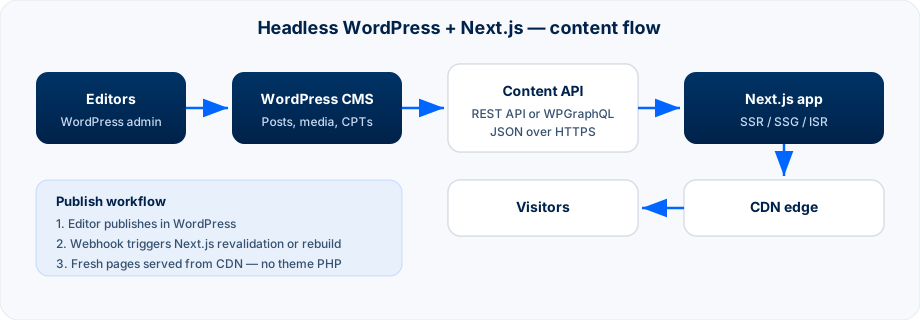
WordPress (content layer). Hosted on managed WordPress infrastructure — Kinsta, WP Engine, or a well-configured VPS — with the WordPress REST API enabled or the WPGraphQL plugin installed. WordPress becomes your headless CMS: a content API, not a public website.
Next.js (presentation layer). Deployed on Vercel, Netlify, or AWS. It fetches content from WordPress at build time for static pages, or at request time when pages need fresh data.
This flexibility is one of the main reasons teams choose WordPress Next.js over a traditional theme:
- Marketing pages and blog posts — static generation at build time.
- Product pages with live inventory — server-side rendering or incremental static regeneration (ISR).
- Personalised landing pages — server-side rendering.
Images pass through Next.js image optimisation — resized, converted to WebP or AVIF, served from a CDN. No plugin required, no manual export workflow. On many projects, this alone accounts for a significant share of the performance gain over standard WordPress.
Headless WordPress + Next.js best practices (2026)
These are the patterns we enforce on production headless builds — the stuff that separates a fast launch from a slow SEO recovery:
- Lock the content model before build. Map every page type, field, and relationship in WordPress before Next.js components exist. Mid-project model changes are expensive.
- Pick REST or WPGraphQL once. Start with the WordPress REST API for simple sites; switch to WPGraphQL only when query complexity or payload size forces it.
- Ship draft preview on day one. Editors must preview unpublished content through Next.js draft mode — not by guessing from the WordPress theme.
- Plan redirects and metadata before launch. Export Yoast or Rank Math fields through the API layer; rebuild sitemaps and structured data in Next.js, not as an afterthought.
- Match rendering to page type. Marketing pages and blog posts → static generation or ISR. Inventory, personalisation, or auth-gated content → SSR.
- Webhook-driven revalidation. Publishing in WordPress should trigger on-demand revalidation or a targeted rebuild — not a manual deploy every time someone fixes a typo.
- Maintain both sides. WordPress still needs updates, security patches, and API performance. A neglected CMS backend slows builds and SSR.
For the official Next.js + headless CMS starting point, see the Next.js data fetching docs and WordPress's REST API handbook — then compare against a real migration budget in our cost guide.
Next.js SEO with headless WordPress
This is the question we get most often, and the answer has real nuance. Done correctly, headless WordPress can improve SEO meaningfully. Done carelessly, it can damage rankings you have spent years building. For the full SEO playbook — metadata from Yoast/Rank Math, sitemaps, crawl checks, and launch checklist — see our headless WordPress SEO guide.
Where the gains come from
Most improvements trace back to performance. Google's Core Web Vitals are ranking signals, and a carefully built Next.js front end typically outperforms a WordPress theme on LCP, INP, and CLS — especially on mobile. Oxbridge Summer Courses passed mobile and desktop Core Web Vitals; Best Summer Courses Guide passed desktop Core Web Vitals with 98 Performance and 100 SEO (lab). Still on WordPress? Start with fixing Core Web Vitals on WordPress before you assume headless is the only fix.
What can go wrong
These are not inherent headless problems. They are migration and implementation problems — the kind that appear when SEO is bolted on at the end rather than treated as a first-class requirement from day one:
- Missing or incorrect redirect maps after launch
- Metadata not surfaced from WordPress (Yoast or Rank Math fields ignored in the API layer)
- Broken or incomplete XML sitemaps
- Canonical URL conflicts between WordPress and Next.js
- Structured data not rebuilt in the new front end
- JavaScript rendering issues on pages that should be fully server-rendered
A WordPress to Next.js migration needs an SEO checklist, not just a design handoff. Plan redirects, metadata, sitemaps, and structured data before the first page goes live.
WordPress REST API vs WPGraphQL
WordPress ships with a REST API. It is well documented and handles most content types without extra plugins. For straightforward sites, the WordPress REST API is usually the right choice — fewer dependencies, simpler maintenance.
WPGraphQL suits more complex content models: nested relationships, selective field queries, and sites where reducing over-fetching matters at scale. It requires a plugin, but the developer experience is often better for large or deeply relational content structures.
In both cases, fetching happens at build time or on the server — not in the browser. The choice is about developer experience and content model complexity, not visitor-facing performance.
Rule of thumb: start with the REST API. Move to WPGraphQL when query complexity or payload size becomes a genuine bottleneck.
Cost and timeline
Headless WordPress is not a cheap project. You are building a Next.js front end from scratch — design, components, routing, data fetching, preview mode, and deployment pipelines. The WordPress side needs configuration, and often custom post types or ACF field groups depending on your content model.
For a marketing site with a blog, expect:
- Budget: £12,000–£25,000 / $15,000–$30,000
- Timeline: 10–16 weeks
That range widens significantly with e-commerce, multilingual requirements, or complex custom post type relationships. Factor in ongoing costs too: you are running two infrastructure pieces instead of one, and deployments must account for both.
Where the investment pays back:
- Performance gains that compound over time
- Editorial flexibility without developer bottlenecks on every page change
- A front end you can extend — new page types, components, market landing pages — without inheriting a theme's constraints
For a detailed breakdown, see our guide on WordPress to Next.js migration costs and timelines.
Where headless WordPress projects fail
After building and migrating several headless setups, three failure patterns come up repeatedly.
1. Scope creep on the content model
Teams start building before agreeing what content types, fields, and relationships they actually need. Define the content model before development starts. Map every page type to its data source. Changes mid-build are expensive in headless projects.
2. Preview mode left unfinished
In traditional WordPress, editors hit Preview and see exactly what visitors will see. In headless, preview requires the Next.js app to fetch draft content from WordPress in a special mode. Next.js supports this through draft mode, but it must be built deliberately. Teams that skip it leave editors publishing blind.
3. Neglecting the WordPress backend
Once WordPress is "just an API," it is easy to treat it as someone else's problem. It still needs updates, security patches, and performance tuning. A slow WordPress backend means slow build times and slow server-side rendering. Both sides of the architecture need ongoing care.
Is headless WordPress right for your site?
Headless WordPress with Next.js makes sense when:
- Your team is committed to WordPress and cannot move to a different headless CMS
- The front end is blocking performance or conversion targets
- You are building a content-heavy site with complex page types that benefit from Next.js rendering strategies
- Plugin sprawl, a broken content model, or licensing issues make the current WordPress setup unmaintainable — and a full CMS migration is not on the table
It is probably not the right move when:
- The site is small and performance issues can be fixed with hosting, caching, and a lean theme
- Budget and timeline do not support building and maintaining two systems
- The team needs page-builder flexibility more than front-end performance
For small sites, start with fixing Core Web Vitals in WordPress or why WordPress is slow. If the underlying problem is the CMS itself — not just the theme — a move to a dedicated headless CMS may be worth evaluating separately from a WordPress Next.js hybrid.
FAQ: Headless WordPress with Next.js
What is Headless WordPress?
Headless WordPress uses WordPress purely as a content backend — editors manage posts, pages, and media in wp-admin, while a separate frontend (usually Next.js) handles what visitors see. WordPress exposes content via REST API or WPGraphQL instead of PHP theme templates. The theme layer is replaced; the CMS is not.
How does Headless WordPress work with Next.js?
WordPress stores and serves content through its API. Next.js fetches that content at build time (static generation) or on a schedule (ISR), renders React components into HTML, and serves pages from a CDN. When an editor publishes, a webhook triggers revalidation so the static pages refresh. Visitors get fast pre-rendered HTML; editors keep the WordPress admin they already know.
Why use Headless WordPress with Next.js for a website?
When your team is productive in WordPress but the front end is blocking performance, SEO, or conversion targets. You keep the editorial workflow, gain Core Web Vitals scores that are hard to hit on plugin-heavy themes, and get front-end flexibility without fighting PHP templates. It's the hybrid path — not a full CMS swap.
When is Headless WordPress with Next.js the right choice?
When performance targets can't be met after a proper WordPress audit, when you need component-based landing pages or app-like interactivity, when you're scaling across markets, or when plugin sprawl makes every change risky. Not for small brochure sites that would pass CWV with caching and a lean theme.
Who benefits from using Headless WordPress and Next.js?
Marketing teams publishing daily who can't afford a slow mobile site. B2B companies competing on search where Core Web Vitals affect rankings. International businesses serving multiple regions from one CMS. Development teams who need design system control without page-builder constraints.
How to set up a WordPress backend for headless use?
Install WordPress on managed hosting, enable the REST API or install WPGraphQL, configure custom post types and ACF fields for API exposure, set up application passwords or JWT for secure API access, disable the public theme (or route all traffic to Next.js), and configure CORS if needed. The setup sections above cover REST vs GraphQL and deployment workflow.
What is the difference between traditional and headless WordPress?
Traditional WordPress couples content and presentation — PHP themes render every page on each request. Headless WordPress separates them: the CMS stores content, the frontend fetches via API and serves pre-rendered HTML from a CDN. You gain speed and flexibility; you lose the simplicity of one system and WYSIWYG theme preview.
What are the advantages of Headless WordPress?
Faster page delivery through static generation and CDN caching, tighter JavaScript and Core Web Vitals control, front-end flexibility without theme limits, better security (wp-admin not publicly exposed), and multi-channel content delivery from one CMS. Editors keep their workflow; visitors get a modern front end.
What are some common use cases for Headless WordPress?
Content-heavy marketing sites with complex page types, multilingual sites with regional routing, SaaS products sharing design systems between marketing and app, e-commerce stores needing fast product pages, and teams outgrowing page builders but committed to WordPress editorial workflow.
What is a headless CMS for WordPress?
A headless CMS for WordPress means WordPress manages content only — posts, pages, media, custom fields — while a separate frontend (usually Next.js) handles what visitors see. WordPress exposes data through REST API or WPGraphQL instead of PHP theme templates. Editors keep wp-admin; the public site is decoupled from the theme layer.
How does a headless CMS differ from a traditional WordPress setup?
Traditional WordPress couples content and presentation — PHP themes render every page on each request. Headless WordPress separates them: the CMS stores content, the frontend fetches it via API and serves pre-rendered HTML from a CDN. You gain performance and front-end flexibility; you lose the simplicity of one system doing everything.
How does a headless CMS work with WordPress?
WordPress stays installed as your content backend. When an editor publishes, WordPress stores the content and notifies the Next.js frontend via webhook. Next.js fetches content through the REST API or WPGraphQL, builds pages with static generation or ISR, and serves them from the edge. Visitors never hit the WordPress PHP layer directly.
How can I implement a headless WordPress architecture for my website?
Configure WordPress REST API or WPGraphQL, build a Next.js app that fetches and renders your content types, set up preview mode for drafts, webhook revalidation on publish, and a redirect map if URLs change. Deploy WordPress on managed hosting and Next.js on Vercel or similar. The architecture and setup sections above walk through each step.
What are some popular headless WordPress CMS solutions?
Headless WordPress itself is the most common — keep wp-admin, rebuild the front end in Next.js. If leaving WordPress entirely, Sanity, Contentful, and Strapi are the most used alternatives. For WordPress-native headless, WPGraphQL and the REST API are the standard integration paths — not separate CMS products.
What is headless WordPress with Next.js?
Headless WordPress keeps WordPress as your content backend while Next.js serves the public site. Editors still use wp-admin; visitors get pre-rendered pages from a CDN. WordPress exposes content via REST API or WPGraphQL — the PHP theme is replaced, not the CMS.
Is headless WordPress with Next.js faster than a normal WordPress site?
Usually yes — by a large margin when built with static generation or ISR. Cached HTML from the edge often delivers TTFB in tens of milliseconds vs hundreds on uncached PHP. A poorly built headless setup can still be slow; architecture and caching strategy matter more than the label.
Can my content team still use WordPress after going headless?
Yes — that's the main reason teams choose headless WordPress over a full CMS swap. Gutenberg, ACF, and your existing editorial workflow stay in wp-admin. The change is preview: drafts render through Next.js Draft Mode, not the old theme.
Will my SEO rankings drop during a WordPress to Next.js migration?
Not if migration is done correctly. You need a complete URL inventory, 1:1 301 redirects, preserved titles and meta, a single sitemap on the new frontend, and Search Console monitoring for 30+ days. Expect a small temporary dip while Google reindexes — not a cliff if redirects are right.
REST API or WPGraphQL for headless WordPress?
REST API is fine for simpler sites and faster prototypes. WPGraphQL wins when you have complex content models, relationships, and custom fields — one query fetches exactly what the page needs. Most marketing sites start on REST; scale or heavy ACF often pushes teams to GraphQL.
How long does a headless WordPress to Next.js migration take?
Straightforward marketing sites (roughly 20–100 pages, no WooCommerce): 6–10 weeks. Larger platforms with custom post types, multilingual content, or e-commerce: 3–6 months. Content migration and redirect QA usually take longer than the React build itself.
Do editors need to learn anything new?
Mostly no. The WordPress admin stays the same. The main adjustment is preview: editors need to understand they are previewing through the Next.js app, not the WordPress theme, which can behave slightly differently during a build or cache cycle. With draft mode properly implemented, the experience is largely seamless.
What happens to my existing WordPress plugins?
Front-end plugins — page builders, theme customisers, anything that outputs shortcodes or modifies WordPress templates — become irrelevant. The front end is Next.js now.
Back-end plugins can stay if the data they generate is accessible via the API:
- SEO plugins (Yoast, Rank Math) — metadata must be exposed through the REST API or WPGraphQL
- ACF — field data is available via API with the right configuration
- WooCommerce — product and order data can be accessed headlessly
Assess each plugin during scoping. Some work cleanly in a headless context; some do not.
How does deployment work?
WordPress and Next.js deploy separately. Content changes in WordPress trigger revalidation or a rebuild in Next.js — usually via webhook. Vercel and Netlify both support this pattern natively. AWS deployments need more configuration, but the workflow is the same.
The important principle: publishing content in WordPress should not require a code deployment in Next.js.
Can I use headless WooCommerce?
Yes. WooCommerce exposes product and order data through the REST API. Cart state, checkout, and payment flows must be rebuilt in React — that is a significant scope increase beyond a content-only headless build. The performance gains on product pages are real, but get a proper scoping session before anyone quotes a fixed price.
Related resources
- WordPress to Next.js migration agency
- WordPress to Next.js migration cost ($10k–$50k)
- Migration checklist (keep SEO)
- Headless WordPress SEO guide
- Headless WordPress & Next.js services
- Technical SEO for Next.js
- Headless WordPress pros and cons
- Fix Core Web Vitals in WordPress
- Oxbridge Summer Courses case study
- Best Summer Courses Guide case study
Bottom line
Headless WordPress is the right answer to a specific problem. It is not a general upgrade, and it is not cheap. When the conditions fit — a committed WordPress editorial team, a front end that needs rebuilding, and budget for both sides of the architecture — the combination of a familiar CMS and a properly built Next.js front end is hard to beat.
The projects that go well share three traits: the content model is agreed before build starts, SEO is a first-class requirement from day one, and both WordPress and Next.js are maintained properly after launch.
We build headless WordPress and Next.js sites for UK and US businesses. Migration service · Cost guide · Performance proof · Book a consultation.