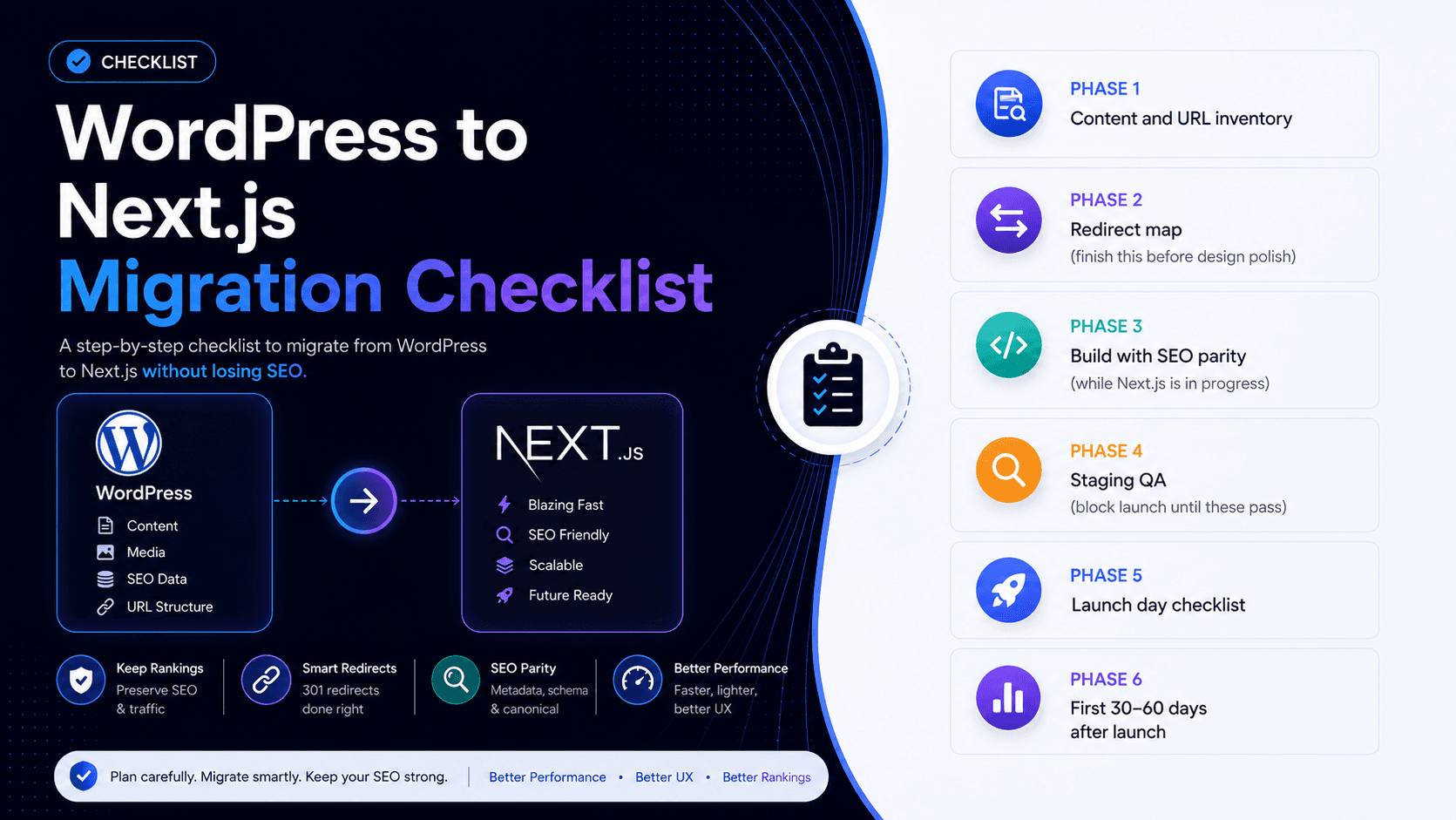
Short answer: you can migrate WordPress to Next.js without losing SEO — if the redirect map, metadata, and Search Console work are finished before launch, not after. Most traffic drops we see aren't "Next.js killed rankings." They're missing 301s, two sitemaps fighting, or titles that never made it onto the new HTML. This is the checklist we use on real cutovers.
If you're still deciding whether to migrate, start with WordPress to headless CMS and cost and timeline. If you've already chosen headless WordPress + Next.js, keep the setup guide open beside this list. For what to implement on the Next.js side after cutover, see technical SEO for Next.js.
What this checklist covers (and what it doesn't)
This is the SEO-safe migration path: inventory → redirects → build parity → staging QA → launch → 30–60 day monitoring. It assumes you're keeping WordPress as the CMS (headless) or moving content into Next.js with a planned URL map. It does not replace a full discovery workshop — it stops the mistakes that wipe organic traffic in week one.
Print it. Put owners next to each line. Launch day is too late to invent who owns redirects.
Phase 0 — Decide you're ready (before any build)
- You've ruled out "just fix WordPress" for performance — see why WordPress is slow and Core Web Vitals fixes if the site is only bloated, not architecturally stuck
- Stakeholders agree: keep WordPress admin vs replace the CMS entirely
- Budget and timeline match reality ($10k–$50k / 6–16 weeks for most marketing sites) — not a weekend rebuild
- Someone owns SEO through cutover (agency or in-house) with GSC and Analytics access
Skip phase 0 and you'll migrate a problem you could have fixed cheaper.
Phase 1 — Content and URL inventory
- Export every public URL from the current sitemap(s) and from Google Search Console → Pages (indexed)
- Pull top landing pages by clicks and impressions (last 3–6 months) — these are non-negotiable redirect destinations
- List templates: homepage, service, blog post, category, landing, legal, custom post types
- Flag pages to kill (thin, duplicate, retired) vs rewrite vs 1:1 migrate
- Note trailing slash, www vs non-www, and HTTP→HTTPS — pick one canonical host for the new site
- Inventory titles, meta descriptions, H1s, and FAQ blocks on money pages (export from Yoast/Rank Math or crawl)
- List structured data types in use today (Organization, FAQ, Article, Product, Breadcrumb)
If a URL ranks and you can't name its new destination, you're not ready to build.
Phase 2 — Redirect map (finish this before design polish)
- One row per old URL → new URL (spreadsheet is fine; CSV for engineers)
- 301 to the specific equivalent page — never dump everything to the homepage
- Preserve paths where you can (
/blog/slug→/blog/slug) to reduce redirect debt - Cover pagination, tag/category archives you still need, and old campaign landing pages
- Plan chained redirects out — A→B→C should become A→C
- Decide where retired content goes: nearest relevant page or a deliberate soft-removal with a clear 404 (rare for ranking URLs)
- Implement redirects on the Next.js / edge / hosting layer that serves the public domain — not only inside WordPress
Incomplete maps are the #1 reason migrations "lose SEO." Build the map early so engineering can test it on staging.
Phase 3 — Build with SEO parity (while Next.js is in progress)
- Set
metadataBaseto the production canonical host (includingwwwif that's your choice) - Unique title + meta description on every indexable route — start from the inventory, improve length later if needed
- Canonical on every public page; disable Yoast/Rank Math sitemap + canonical output on the WordPress origin once Next.js owns the public site
- One sitemap on the Next.js domain (
app/sitemap.ts); submit it in GSC at launch - JSON-LD rebuilt on Next.js (don't rely on plugin schema that never reaches the public HTML)
- Internal links updated to new paths — no leftover theme permalinks in content
- Images: dimensions, modern formats, stable LCP element — don't ship a slower Next.js than the WordPress you replaced
- Preview / draft / API routes:
noindex+ robots disallow - Rendering default for marketing pages: SSG or ISR so crawlers get finished HTML
Parity means "as good or better than live WordPress on day one," not "we'll tidy metas in month two."
Phase 4 — Staging QA (block launch until these pass)
- Crawl staging (or a sample of top 100 URLs): status codes, title tags, canonicals, H1s
- Spot-check View Source / curl — main content in the initial HTML, not only after client JS
- Test the redirect map: old URLs return 301 to the right destination (not 302, not soft 404)
- Rich Results Test on a blog post, a service page, and the homepage
- Mobile PageSpeed on homepage + top 3 landing pages — LCP / CLS / INP in a sensible range
- Forms, CTAs, analytics, and conversion pixels fire on the new templates
- Editors can publish (or preview) without breaking production
If staging SEO QA is "we'll do it live," you're gambling the rankings that paid for the rebuild.
Phase 5 — Launch day checklist
- DNS / hosting cutover with redirects live on the public host
- Confirm HTTPS and preferred domain (www or apex) match canonicals and GSC property
- Submit the new sitemap in Google Search Console
- Request indexing for homepage + top 5–10 money URLs (once each — not every URL on the site)
- Verify robots.txt allows crawling and points at the sitemap
- Remove or block the old theme's public URLs if WordPress is still reachable on a separate host
- Watch real-user analytics and server 404 logs for the first 24–48 hours
Phase 6 — First 30–60 days after launch
- GSC daily for week one, then a few times a week: coverage errors, soft 404s, spike spikes
- Fix any missed redirects within days — not in the next sprint backlog
- Compare impressions/clicks on the top landing pages you inventoried in phase 1
- Expect a short recrawl dip; panic only if money URLs 404 or canonicals point at the wrong host
- Don't mass-change titles and URLs again in the same window — let Google settle
A clean migration usually recovers within weeks. A messy one can take months — and it's almost always the map and the metadata, not the framework.
Common ways teams still lose SEO
- Homepage redirects for "anything we forgot"
- WordPress SEO plugin sitemap still live alongside Next.js
- Canonicals pointing at staging, localhost, or the WordPress origin
- Client-only rendering for blog or service pages
- Changing every URL "because Next.js" when paths could have stayed the same
- No owner on GSC for the first month
FAQ: migrate WordPress without losing SEO
Can I migrate WordPress to Next.js without losing SEO?
Yes — keep URL paths where possible, 301 every changed URL to a specific page, preserve titles and descriptions at launch, rebuild schema on Next.js, submit one sitemap, and monitor Search Console for 30–60 days. The stack isn't the risk. Skipping that list is.
What is the WordPress to Next.js migration checklist?
Inventory URLs and metas → finish the redirect map → build with metadata/canonical/sitemap/schema parity → staging crawl and redirect tests → launch with sitemap submit → watch GSC for 30–60 days. Cost and timeline sit in a separate planning doc — see our migration cost guide.
How do I migrate from WordPress to a headless CMS without losing rankings?
Treat SEO as a workstream from day one. Export ranking URLs from Search Console, map each to a new destination, implement 301s on the public host, and don't cut over until staging proves content is in the HTML and redirects resolve correctly.
Should I change URL structure during migration?
Only when the old structure is broken or blocking the new IA. Every changed path needs a redirect and slows recrawl. Same paths = less risk.
Do I keep Yoast or Rank Math after going headless?
Editors can still use fields in WordPress if you map them into Next.js metadata. Turn off the plugin's public sitemap, robots, and canonical output on the origin so only Next.js speaks to Google.
How long until rankings stabilise after migration?
Often a few weeks of noise while Google recrawls. Serious drops that don't recover usually mean 404s, bad redirects, or duplicate indexing — fix those first, don't rewrite all content in panic.
Is a big-bang launch safe?
Only with a complete redirect map and staging QA. Prefer incremental cutover (proxy some paths to Next.js first) on large or high-traffic sites. Big-bang without a map is how SEO disasters happen.
Who should own this checklist?
One named owner with GSC access — agency lead or in-house SEO — not "the developers will remember." Engineering implements; SEO signs off on phases 2, 4, and 6.
Related resources
- WordPress to Next.js migration agency
- Migrate WordPress to a headless CMS
- Migration cost and timeline
- Headless WordPress + Next.js guide
- Technical SEO for Next.js
- WordPress vs Next.js SEO
- Technical SEO services
- Oxbridge case study
- Best Summer case study
Bottom line
Migrating WordPress to Next.js without losing SEO is a process, not a hope. Inventory, redirect map, parity on metadata and schema, staging proof, then patient monitoring. Skip any of those and the framework gets blamed for a planning failure.
We run this checklist on headless WordPress + Next.js migrations for businesses worldwide. Migration service · Services · Performance proof · Book a consultation.